


The Microsoft Power Platform is one of those technologies that nearly every business has access to, but very few fully understand.
For some, it feels intimidating. For others, it sounds like another buzzword-heavy toolkit that promises a lot but is hard to apply. And for many organizations, pieces of it are already in use without a clear strategy tying everything together.
This guide is not meant to overwhelm you with technical detail. Instead, it explains what the Power Platform actually is, how the components work together, and where businesses realistically see value when it is implemented intentionally.
What the Microsoft Power Platform Really Is
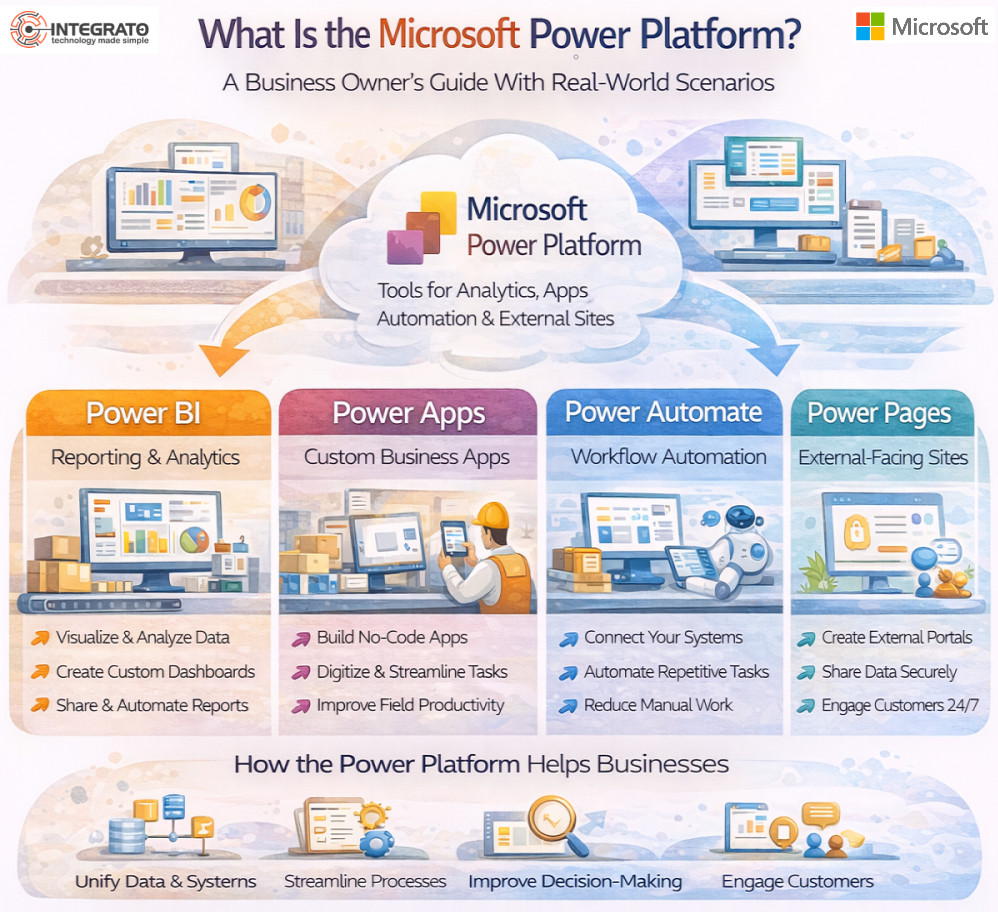
At its core, the Microsoft Power Platform is a set of tools designed to help organizations analyze data, automate processes, and build lightweight applications without heavy custom development.
The platform is made up of four primary components:
- Power BI for reporting and analytics
- Power Apps for building custom applications
- Power Automate for workflow automation
- Power Pages for building simple external-facing websites
Individually, these tools solve specific problems. Together, they create a flexible layer that connects systems, data, and people.
Why the Power Platform Exists
The Power Platform was designed to address a very real business problem. Traditional systems are good at storing data, but they are not always great at adapting quickly when processes change.
Businesses often respond by:
- Relying heavily on spreadsheets
- Adding manual steps between systems
- Creating one-off solutions that are hard to maintain
The Power Platform fills the gap between what core systems do well and what teams need day to day.
Power BI: Turning Data Into Insight
Power BI is often the first Power Platform tool organizations encounter. It focuses on reporting, dashboards, and analytics.
Real-World Scenario
A finance team pulls data from an ERP system, CRM, and budgeting spreadsheet. Instead of reconciling multiple reports manually, Power BI brings that data together into a single, interactive dashboard. Leadership sees up-to-date performance metrics without waiting days for reports.
Power BI is powerful because it allows users to explore data visually while still maintaining governance and consistency.
Power Apps: Solving Process Gaps With Custom Apps
Power Apps allows teams to build simple applications that address specific needs. These are not replacements for ERP or core systems. They are tools that sit alongside them.
Real-World Scenario
An operations team tracks equipment inspections using paper forms and email. A Power App replaces this with a mobile-friendly app where inspections are logged, photos are attached, and issues are routed automatically.
The result is faster response times and better visibility, without a lengthy software project.
Power Automate: Reducing Manual Work
Power Automate connects systems and automates repeatable tasks. It handles workflows that would otherwise require manual intervention.
Real-World Scenario
A company receives customer requests through multiple channels. Power Automate creates tasks, notifies the right teams, and updates records automatically. What once required multiple handoffs becomes a consistent, repeatable process.
Automation works best when it simplifies existing processes rather than trying to fix broken ones.
Power Pages: External Experiences Without Heavy Development
Power Pages allows organizations to build simple, secure websites that connect to internal data.
Real-World Scenario
A business creates a customer portal where clients can submit requests, view status updates, or update information without emailing back and forth. Internal teams spend less time responding to routine inquiries.
How the Power Platform Works With ERP Systems
One of the biggest strengths of the Power Platform is how it integrates with systems like Microsoft Dynamics 365 Business Central.
Instead of forcing the ERP to handle every unique workflow, the Power Platform extends it. Data stays centralized, while flexibility increases at the edges.
This approach keeps core systems stable while still allowing teams to adapt.
Common Mistakes We See
The Power Platform is often misunderstood or misused.
Common issues include:
- Building apps without governance
- Automating inefficient processes
- Creating tools that no one adopts
- Treating the platform as a replacement for ERP
Success depends on clear goals, ownership, and alignment.
When the Power Platform Makes the Most Sense
Businesses tend to see the most value when:
- Processes involve multiple systems
- Manual work creates bottlenecks
- Reporting requires too much effort
- Teams need flexibility without major system changes
It is not about automating everything. It is about improving the right things.
Why Strategy Matters More Than Tools
The Power Platform is powerful because it is flexible. That flexibility is also what creates risk if there is no strategy.
Without clear direction, tools proliferate, data becomes fragmented, and support becomes difficult.
With the right approach, the Power Platform becomes a practical layer that improves efficiency, visibility, and responsiveness.
How Integrato Approaches the Power Platform
We focus first on understanding the process, not the technology. We help teams identify where the Power Platform adds value and where it does not.
Sometimes the right answer is automation. Sometimes it is simplifying the underlying process. And sometimes it is leaving things alone.
That honest assessment is what keeps Power Platform initiatives sustainable.
Why the Power Platform Deserves a Thoughtful Approach
The Microsoft Power Platform is not a silver bullet. Used well, it can remove friction, reduce manual work, and improve decision-making.
Used without intention, it can create complexity.
The difference comes down to alignment. When tools support how people actually work, technology becomes an asset rather than a burden.